
The Silent Screen: Why Your Smart Thermostat Just Went Blank
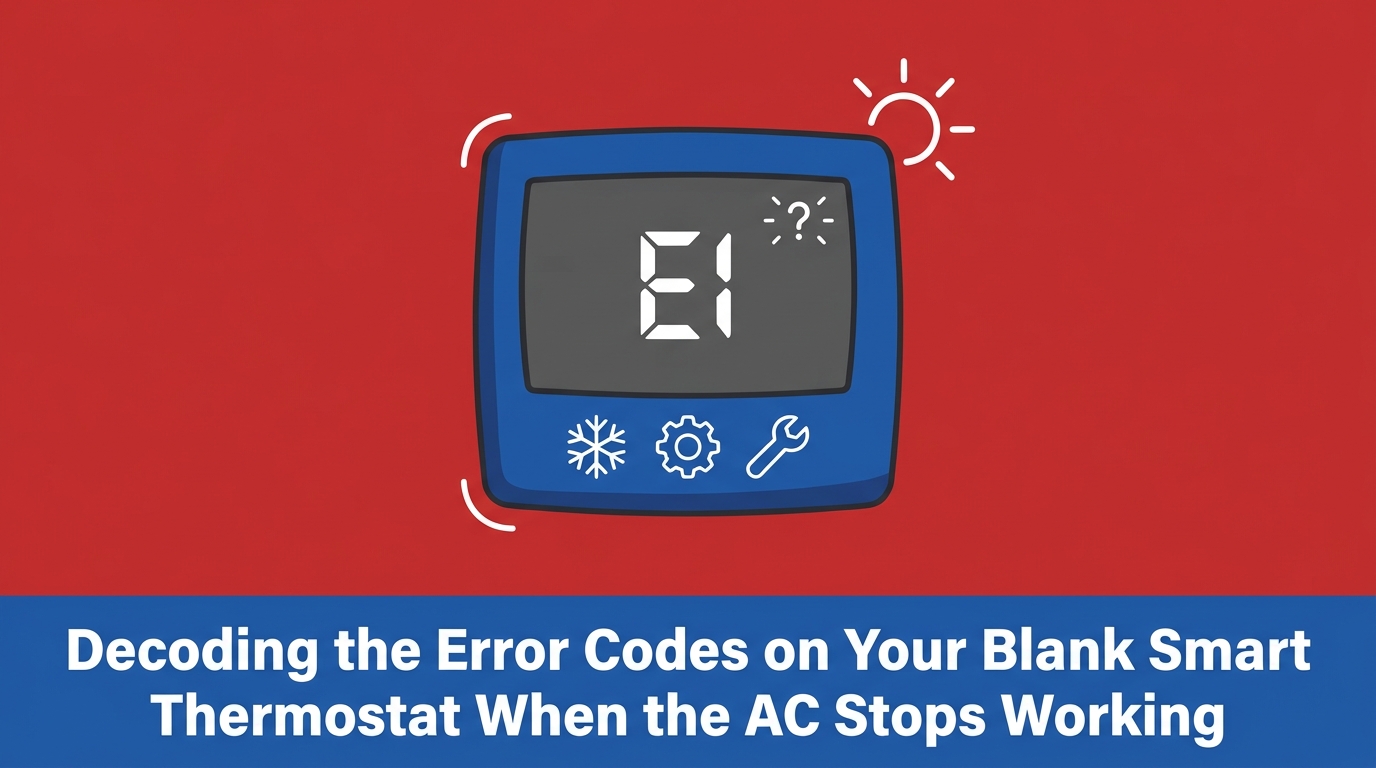
The house feels uncomfortably warm, the vents are completely quiet, and when you walk over to adjust the temperature, you are met with a completely dark screen. Decoding the Error Codes on Your Blank Smart Thermostat feels impossible when the device will not even power on. During peak August late-summer cooling demands, an unresponsive thermostat is one of the most frustrating things a homeowner can experience. Here at Carl's Quality Cooling and Heating LLC, our dispatch team fields panicked calls every August from homeowners whose first instinct is to assume the thermostat itself has broken, the batteries have died, or the Wi-Fi connection simply needs to be reset.
However, modern smart thermostats operate very differently from older models. When a smart thermostat screen goes completely blank, our technicians often find that the real diagnostic story is happening somewhere else in your home. The blank screen is not a glitch; it is a symptom of a protective system shutdown. The wall unit has lost its power supply from the main equipment, meaning no amount of button mashing or router resetting will bring it back to life.
The key to resolving this issue is shifting your focus away from the wall and toward the indoor HVAC equipment. By identifying the root cause of the power loss, you can safely observe the indoor unit's hidden diagnostic codes and gather the exact information a professional needs to restore your comfort. If you are experiencing this right now, exploring comprehensive air conditioning services is the ultimate solution, but understanding what is happening behind the scenes is your best first step.
The Hidden Connection: Understanding 24-Volt Power Loss
To understand why your thermostat went blank, you have to understand how it gets its power. Older, traditional thermostats often ran on AA batteries, meaning they operated independently of the main HVAC system's electrical supply. Modern smart thermostats, however, are essentially small computers mounted to your wall. They require a continuous, dedicated supply of electricity to keep their screens lit, maintain Wi-Fi connections, and process complex cooling schedules.
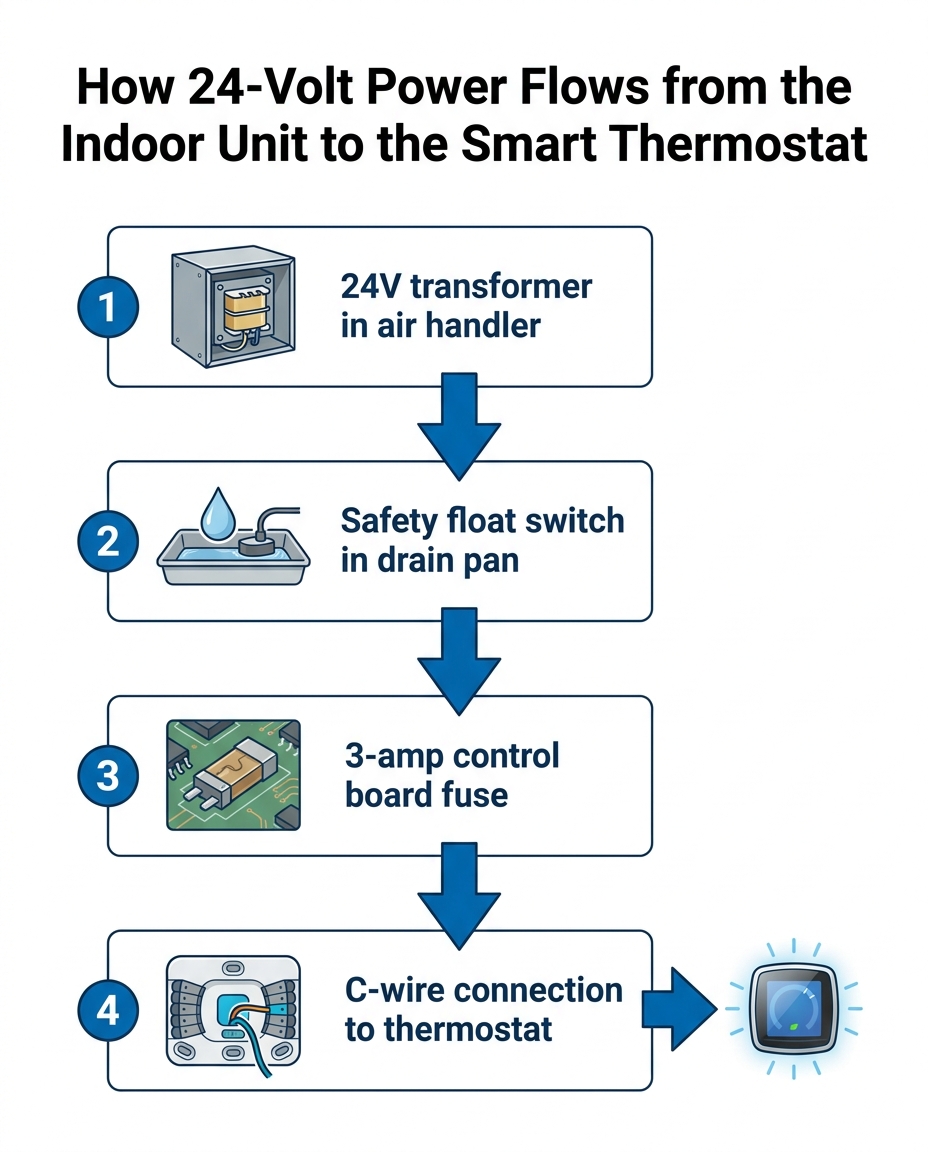
This continuous power is delivered via a specific wire—commonly known as the "C-wire" or common wire—which connects directly to the control board inside your indoor air handler or furnace. The indoor unit houses a transformer that steps down your home's standard high-voltage electricity into a safe, low-voltage current. In our field experience, when a 24-volt low voltage power loss occurs anywhere in that circuit, the smart thermostat instantly shuts down to protect its delicate internal components and prevent further damage to the system.
The problem: Your smart thermostat has no backup power source to display error codes when this primary connection is severed.
The cause: A safety mechanism inside the indoor air handler has deliberately interrupted the electrical circuit to prevent a larger catastrophe.
The solution: You must stop troubleshooting the wall device and look to the indoor equipment to find out why the power was cut.
If your system is behaving erratically before shutting down completely, such as an instance where the AC fan stops working but you hear humming, it is a strong indicator that electrical components in the indoor unit are struggling and may soon trigger a complete 24-volt shutdown.

Common Triggers Behind a Tripped HVAC Safety Switch
In the Conroe area, our specific climate challenges play a massive role in why HVAC safety switches trip. Our team typically sees a massive spike in these calls when the combination of intense late-summer heat and severe thunderstorms creates the perfect environment for triggering a 24-volt low voltage power loss. These safety mechanisms are not nuisances; they are critical safeguards designed to prevent catastrophic water damage to your ceilings or electrical fires in your attic.
Condensate Line Clogs
During intense August late-summer cooling, your air conditioner pulls gallons of humidity out of the indoor air every single day. This moisture drips into a condensate drain pan and flows outside through a PVC pipe. However, if algae, dirt, or debris clogs that pipe, the water begins to back up into the pan. As veteran HVAC professionals, we can tell you that a clogged condensate line is the culprit behind a vast majority of the blank thermostats we encounter.
To prevent this water from overflowing and destroying your drywall, modern HVAC systems are equipped with a condensate overflow float switch. As the water level rises, a small plastic float lifts up. Once it reaches a certain height, it physically breaks the 24-volt electrical circuit. The moment that circuit breaks, your smart thermostat goes completely blank. It will not power back on until the water is cleared and the switch drops back down.
Electrical Surges and Blown Fuses
The other major culprit is severe weather. Conroe is no stranger to intense thunderstorms that bring sudden electrical surges. Inside your indoor air handler's control board sits a small, 3-amp automotive-style fuse. This fuse acts as a sacrificial lamb for your system.
If a power surge hits the unit, or if a wire shorts out due to vibration, that tiny fuse will blow instantly to protect the expensive control board and the smart thermostat from taking the brunt of the voltage spike. One local homeowner experienced this exact scenario right before a severe late-summer thunderstorm rolled through. Their system malfunctioned and the screen went dark. One of our technicians arrived as soon as it was safe, diagnosed a blown low-voltage fuse from a nearby lightning strike, and fixed the issue within an hour. Without that fuse, the entire control board would have been destroyed.
Where to Look Next: Finding the Indoor Air Handler's Sight Glass
Once you realize the blank screen is caused by a loss of power from the main equipment, the next step is safely gathering information. You can do this by locating the indoor air handler and finding its sight glass. The indoor unit is typically located in a dedicated interior closet, up in the attic, or out in the garage.
Strict Safety Warning: This process is for safe visual observation only. You should never remove the metal doors, unscrew panels, or attempt to bypass safety switches. High-voltage electricity is present inside the cabinet, and opening it without proper training is incredibly dangerous.
1. Locate the indoor unit: Find the large metal cabinet that houses your blower motor and evaporator coil.
2. Ensure the area is well-lit: Bring a flashlight if the unit is in a dark attic or poorly lit garage.
3. Find the lower blower door: Look at the bottom half of the metal cabinet.
4. Locate the sight glass: Search for a small, clear, or tinted plastic window—usually about the size of a quarter—built directly into the metal panel.
5. Observe the control board: Look through this glass window into the dark cabinet. You are looking for a small LED light mounted on the internal circuit board.
By looking through this window, you can observe the system's diagnostic LED flash sequences (e.g., fast flash vs. slow flash). These lights are the actual error codes your system is trying to communicate, completely bypassing the dead smart thermostat.
Decoding the Diagnostic LED Flash Sequences
HVAC manufacturers know that when a system shuts down, technicians need a starting point for their troubleshooting. That is why modern control boards utilize diagnostic LED flash sequences (e.g., fast flash vs. slow flash) to indicate specific system faults. Much like Morse code, the control board uses patterns of light to tell you exactly what safety switch was tripped or what component failed.
When you look through the sight glass, you need to count the blinks carefully. The pattern will usually repeat itself after a brief pause.
• Solid Light (No Blinking) — Common Diagnostic Meaning: System has power and is functioning normally.
• Fast Continuous Flashing — Common Diagnostic Meaning: Often indicates a reversed polarity or grounding issue.
• Two Short Flashes, Pause — Common Diagnostic Meaning: Typically indicates an open pressure switch or draft safeguard issue.
• Three Short Flashes, Pause — Common Diagnostic Meaning: Commonly signals a high limit switch fault or restricted airflow.
• Completely Dark (No Light) — Common Diagnostic Meaning: Confirms a total loss of 24-volt power or a blown 3-amp fuse.
The exact translation of these codes is printed on a schematic glued to the inside of the blower door. However, because you are practicing safe visual observation and not opening the door, you do not need to read the schematic. Simply noting the pattern—such as "three short flashes followed by two long flashes"—is enough. If the sight glass is completely dark and there is no LED light at all, our team can confirm that the 24-volt low voltage power loss is total, likely pointing straight to a blown fuse or a tripped float switch.
What to Do (And What Not to Do) With Flash Code Information
The problem: Homeowners often find the flash code and immediately want to fix the issue themselves to get the air conditioning back on.
The cause: The desire for immediate comfort leads people to watch DIY videos on bypassing float switches or replacing internal fuses.
The solution: Use the flash code information strictly for communication with a professional, ensuring the repair is done safely and correctly.
Gathering diagnostic LED flash sequences is for informational purposes only. You must never touch internal components, handle high-voltage wiring, or attempt to replace a blown fuse without diagnosing what caused the short in the first place. If a fuse blew, it blew for a reason; putting a new one in will simply result in another blown fuse and potential damage to the board.
At Carl's Quality Cooling and Heating, our veteran-owned ethos is built on empowering homeowners with honest, practical steps to gather critical diagnostic info safely before one of our professionals arrives. We want you to be informed, but we also want you to be safe. When you call to schedule an HVAC service call, relay the specific flash pattern to our dispatchers. Tell them, "My thermostat is blank, and I looked through the sight glass on the indoor unit and saw a repeating pattern of four fast flashes." This simple piece of information saves our technicians valuable diagnostic time upon arrival, allowing them to bring the right parts and get your system running faster.
Proactive Measures to Prevent Future Power Interruptions
The best way to deal with a blank smart thermostat is to prevent the underlying safety switches from tripping in the first place. Proactive maintenance is the key to keeping your 24-volt electrical system stable, especially during heavy August late-summer cooling when the equipment is working its hardest and families are busy with the back-to-school transition.
• Keep the condensate drain line clear: Having a professional flush the PVC drain line regularly prevents algae and sludge from building up. A clear line means water cannot back up into the pan, ensuring the float switch never has a reason to trip and cut your power.
• Install dedicated HVAC surge protectors: To defend against Conroe's severe thunderstorms, a professional can install surge protectors directly on your HVAC equipment. These devices absorb voltage spikes before they can reach the control board and blow the 3-amp low-voltage fuse.
• Commit to routine seasonal tune-ups: Regular inspections catch failing components before they cause a total system shutdown. One local family had their AC go out unexpectedly in a newly built house during the late-summer heat. A technician from our team came the next day with the right parts and repaired the unit, making the house ice cold again—a disruption that routine, proactive checks can often prevent entirely.
By enrolling in a comprehensive HVAC maintenance plan, you ensure that these critical safety switches, fuses, and drain lines are inspected and cleared by a professional long before they have the chance to leave you with a blank screen on the hottest day of the year.
Frequently Asked Questions About Blank Thermostats and AC Failures
Why is my thermostat blank and ac not working?
A blank thermostat usually indicates a total loss of 24-volt power from the indoor HVAC unit, not a broken thermostat. When a safety mechanism—like a condensate float switch or a blown control board fuse—trips, it instantly cuts the electrical circuit to the wall unit. This protective shutdown prevents further damage to your system or water damage to your home.
How do I fix a thermostat screen blank issue?
You cannot fix a blank screen at the thermostat itself if the root cause is a power loss from the indoor unit. The fix requires identifying why the indoor air handler stopped sending 24-volt power, which often involves clearing a clogged drain line or replacing a blown fuse. Because these repairs involve high-voltage equipment, we strongly advise that they be performed by a licensed HVAC technician.
Is there a thermostat blank screen reset button?
No, modern smart thermostats do not have a magic reset button that will bypass a 24-volt power loss. While you can sometimes restart the device by removing it from the wall plate and plugging it back in, the screen will remain blank if the indoor unit's safety switches are actively blocking the electrical current. The system requires a physical repair, not a digital reset.
What does a blinking red light on my AC indoor unit mean?
A blinking light on the indoor control board is a diagnostic LED flash sequence used to communicate specific system errors. Different patterns, such as a fast flash versus a slow flash, correspond to different faults like a tripped high-limit switch or a restricted airflow issue. Safely noting this flash pattern through the unit's sight glass helps our technicians diagnose the problem much faster upon arrival.
Can a clogged AC drain pipe cause my thermostat to turn off?
Yes, a clogged drain pipe is one of the most common reasons a smart thermostat turns off unexpectedly. When the pipe clogs, condensation backs up into the drain pan and lifts a safety float switch. This switch is wired directly into the thermostat's power circuit, and when it trips, it cuts the power instantly to prevent the pan from overflowing.
Relay Your Findings to a Local HVAC Expert
Ultimately, a blank screen on your wall is a symptom of a protective shutdown, not necessarily a broken device. When you face this issue, remember that the real story is happening inside your indoor air handler. By safely locating the sight glass and noting the diagnostic LED flash sequences (e.g., fast flash vs. slow flash), you become a crucial part of the troubleshooting process.
Do not attempt to open the panels or bypass the electrical safety switches yourself. Instead, write down the flash codes you observe and share them with our qualified local technicians. Reach out to Carl's Quality Cooling and Heating LLC today to restore your cooling safely, efficiently, and correctly.